
News
Direct answer: A preventive maintenance calendar for an SMT line is one page that lists, for every station on the line, what gets checked, how often, by whom, and what record proves it was done. Daily checks are short startup checks done by the operator; weekly checks cover wear and consumables; monthly checks cover calibration and lubrication; quarterly and annual work is full calibration and a vendor service. The intervals themselves do not come from this article — they come from each machine’s own manual, and several JHIMS machines publish their maintenance schedule on their product page. Build the calendar once, assign a named owner to every row, and schedule the work into changeovers and shift ends instead of stopping the line for it. The checks that fail first are the ones with no owner and no record.
An SMT line has five or more machines and no single manual covers the line. The printer has its own schedule, the placement machine has its own, the oven has its own, and the inspection stations have theirs. Left as separate documents, those schedules are read once at installation and then forgotten. A line calendar pulls them into one place so that a shift lead can see, on one page, what is due today, who is doing it, and whether last week’s work was actually recorded. This article explains how to build that page: what belongs at each frequency, how to assign ownership, what a useful record contains, and how to fit the work around production. It is a planning guide, not a machine manual — it contains no machine-level procedure for any station, and it states no maintenance interval as a standard.
One scope note up front. JHIMS builds and supplies SMT equipment; it does not sell a maintenance service. This calendar is the buyer’s own plan, built from the manuals of the machines on their line. Where a machine is named below, the facts quoted for it are the manufacturer’s published figures from its product page, and the schedule quoted for it is the schedule that page itself publishes.
A line calendar answers four questions for every station: what is checked, how often, by whom, and where is it written down. If a row cannot answer all four, it is not a calendar entry — it is a wish. “Check the printer weekly” fails the test: it does not say what is checked, who checks it, or where the result goes. “Operator inspects the squeegee blades every morning before the first board and signs the printer log” passes it.
Three neighbouring documents are often confused with the calendar, so the boundaries matter. First, each machine’s own manual is the source of the tasks and the intervals — the calendar points at it, it does not replace it. Second, a machine-level maintenance guide is a different document: it explains how to do one machine’s checks step by step. This article is not that guide for any machine on the line, and it deliberately contains no reflow-oven maintenance procedure at all — the oven’s chain, blower, heater, flux and profile-drift checks belong to the oven’s own maintenance guide and its manual, not to a line-planning article. Third, a spare-parts list is not a calendar: knowing which parts to stock is useful, but this article lists no parts and no part numbers.
The calendar’s value is the system around the checks, not the checks themselves. Two lines can own identical machines and still get different results from maintenance, because one line has owners, windows and records and the other has a manual on a shelf. That system is what the rest of this article builds.
Every maintenance task on a line falls into one of four frequencies, and the frequency decides who does it and when. Daily checks are short, done by the operator at startup, and take minutes: confirm the air supply, look at the wear parts, run the cleaning cycle, check the consumable level, and run a test piece before production. Weekly checks are the wear-and-consumables round: belts, filters, rails and screws, done by the operator or a technician in a planned window. Monthly checks are calibration and lubrication: the checks that keep the machine accurate rather than merely running. Quarterly and annual work is full calibration and a vendor service visit.
The best way to see the shape of a frequency is a real published schedule. The M8 solder paste printer’s product page publishes one: daily, clean the vision-system lenses and inspect the squeegee blades; weekly, verify transport belt tension and check air filtration; monthly, calibrate the vision system, inspect linear-guide lubrication and verify CCD alignment; quarterly, full system calibration, replace the cleaning paper roll, inspect the vacuum pump and re-grease the ball screw; annually, a comprehensive service by a JHIMS certified engineer. The same page also publishes a daily startup checklist — verify the air supply at 4–6 Kgf/cm², inspect the squeegee blades, run a dry cleaning cycle, calibrate conveyor width for the first batch, verify stencil alignment with fiducial marks, check the solvent level, and run a test print and inspect it with 2D inspection before production starts.
The L5 printer’s page publishes the same shape with different contents: weekly, clean all guide rails and ball screws, inspect air filters and check belt tension; monthly, lubricate the linear guides, calibrate squeegee parallelism and verify CCD alignment; quarterly, full system calibration, replace the cleaning paper roll, inspect the vacuum pump and update the operating system; annually, a comprehensive service by a JHIMS certified engineer. Its daily startup checklist mirrors the M8’s — air supply at 4.5–6 Kg/cm², squeegee blade inspection, a dry cleaning cycle, conveyor-width calibration, stencil alignment by fiducials, solvent level, and a test print checked with 2D inspection.
Two things are worth noticing. First, the two printers agree on the structure — daily, weekly, monthly, quarterly, annual — and disagree on the details, because they are different machines. That is exactly why the calendar must take its intervals from each machine’s own manual: a frequency copied from the wrong machine is worse than no frequency at all, because it looks authoritative while being wrong. Second, both pages put the daily startup checklist next to the schedule. The startup check is the daily row of the calendar in action: the same checks, done every morning, signed off before the first production board.
The rule for intervals: no interval in this article is a standard. If a row below says “weekly” or “monthly”, that is the frequency the machine’s own published schedule uses for that machine — or, where no published schedule is quoted, the frequency band this article suggests you confirm against the manual before you write it into your calendar. Never copy a frequency from one machine’s page onto a different machine.
The table below is the calendar in miniature: one row per station, with the daily, weekly and monthly-plus columns, an owner, and the record that proves the work. It is written for a typical line — printer, placement, reflow, inspection, dispensing and screw fastening — and it should be edited to match the machines actually on the floor. Rows for machines the line does not have should be deleted, not left in as decoration; a calendar with rows nobody owns is worse than a short one, because it teaches the team that the calendar is fiction.
| Station | Daily (operator, at startup) | Weekly | Monthly and beyond | Owner / record |
|---|---|---|---|---|
| Solder paste printer (M8 / L5) | Air supply, squeegee blade condition, dry cleaning cycle, solvent level, test print checked with 2D inspection | Guide rails and ball screws cleaned, air filters inspected, belt tension checked | Monthly: linear-guide lubrication, squeegee parallelism and CCD alignment. Quarterly: full calibration, cleaning paper roll, vacuum pump. Annually: vendor service | Operator daily; technician weekly and monthly / printer log |
| Pick and place (YSM10 / YSM40R) | Nozzle condition, feeder seating, camera lens clean, first-board placement check | Feeder condition round, nozzle cleaning and rotation, conveyor and rail check | Monthly: feeder calibration and placement accuracy verification, per the placement machine manual. Annually: vendor service | Operator daily; technician monthly / placement log |
| Reflow oven (R10) | Startup check per the oven manual, then the first boards watched for profile drift | Per the oven manufacturer’s maintenance plan | Per the oven manufacturer’s maintenance plan | Oven operator and technician / oven maintenance log |
| Inspection (SPI / AOI) | Camera and lens clean, lighting check, test board through the inspection step | Calibration verification against the reference board, per the vendor manual | Monthly: full calibration check and software and program backup, per the vendor manual | Operator daily; quality technician weekly and monthly / inspection log |
| Dispensing (D900) | Nozzle and tappet condition, first-dot check on a test piece | Dispensing-path cleaning and consumable check, per the dispensing machine manual | Monthly: accuracy verification and wear-part review, per the manual. Annually: vendor service | Operator daily; technician monthly / dispensing log |
| Screw fastening (ZM320 / BL18) | Feeder bowl and feed path clear, driver bit condition, first screws torque-checked | Feeder and drive-head cleaning, camera alignment check, per the machine manual | Monthly: accuracy and torque verification, per the manual. Annually: vendor service | Operator daily; technician monthly / fastening log |
| Line and utilities | Compressed-air pressure and dryness, conveyor running true, no alarms standing | Air filters and drains, conveyor belts and rails, exhaust running | Monthly: air-system review and electrical check. Annually: full facility review with the line service | Facility technician / line log |
The reflow row is deliberately the shortest row in the table. That is not an omission: the oven’s maintenance tasks belong to the oven’s own maintenance guide and its manual, and a line-planning article that reproduced them would be the wrong document in the wrong place. The calendar’s job for the oven is to name the owner, reserve the window, and point at the plan — not to rewrite the plan.
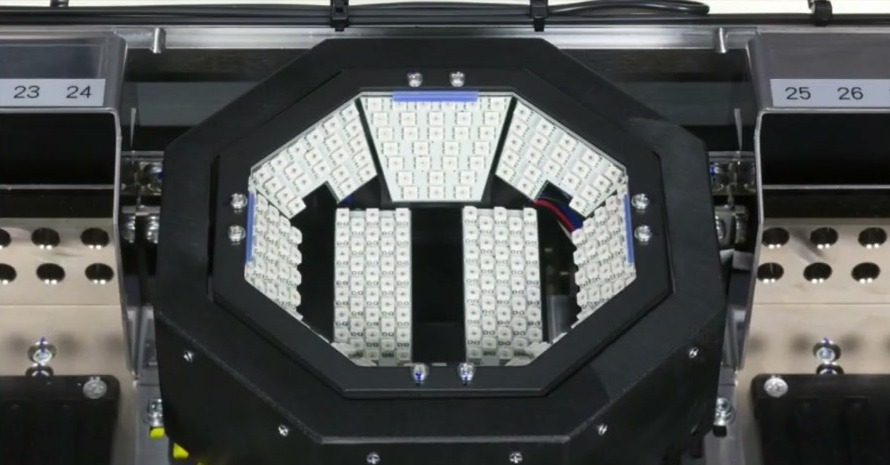
The placement machine’s multi-function camera, between feeder slots 23 and 26. The camera and its lighting are one of the items the placement row checks — the photograph shows the camera itself, not a maintenance task being performed.
Two details in the table deserve a second look. First, the inspection row is where a dirty lens becomes a line problem: a camera that cannot see clearly produces false rejects, and false rejects send good boards back for rework that they do not need. The daily lens and lighting check is cheap; the rework it prevents is not. A buying-order guide for SPI and AOI is a useful companion here, because the inspection stations only earn their place on the calendar if they were the right stations to buy in the first place. Second, the printer row is the only row whose contents are quoted from a published schedule in this article, and it is quoted because the schedule is published on the machine’s own product page. Every other row is written at the level of “what kind of check, and who owns it” — the detail lives in that machine’s manual.
For the machines in the table, see the M8 solder paste printer and the L5 solder paste printer, whose pages publish their maintenance schedules and daily startup checklists; the Yamaha YSM40R pick and place machine; and the R10 reflow oven. For the placement accuracy the calendar protects, see Fiducial Marks: The Small Circles That Decide Whether Placement Lands Where It Should, and for the inspection stations on the calendar, see SPI or AOI First? A Buy-Order Decision Guide for SMT Lines.
The most common reason a calendar fails is not a missing task — it is a missing owner. A row that says “maintenance” as the owner will be done by nobody, because everybody on the shift can reasonably assume somebody else did it. Every row needs a named role, and the role has to match the skill the check needs. Daily startup checks belong to the operator who runs that station: they are short, they happen before the first board, and the operator is the person standing there. Weekly wear and consumable checks can stay with the operator or go to a line technician, depending on the machine. Monthly calibration and lubrication belong to a technician. Quarterly full calibration and the annual service belong to a technician and the vendor’s service engineer.
Ownership also needs a second name: the person who checks that the check happened. On a small line that can be the shift lead, who signs the week’s log on Friday. On a larger line it can be the quality technician, who reviews the inspection log against the defect log. The point is the same: a check that nobody reviews is a check that quietly stops happening, and the first sign of that is usually a defect, not an empty logbook.
Staffing the calendar is part of staffing the line. A line that needs one operator per station has no time left for weekly checks unless the calendar is built into the shift plan — which is why the operator question and the maintenance question belong together. For the staffing side, see How Many Operators Does an Automated SMT Line Actually Need?. If the calendar asks for more hands than the shift has, the answer is not to drop checks silently; it is to say so, move the weekly work into a planned window, and record the gap until it is staffed.
A record exists for two reasons: to prove the check was done, and to show the next person what was found. A tick in a box proves the first and nothing about the second. A useful record carries eight fields: date and shift; machine and station; the check performed; the result, in the machine’s own terms where possible; any measurement or reading taken; the name of the person who did it; the next due date for that check; and any follow-up action with its own owner. The follow-up field matters most: a check that finds a worn blade and records no action is a check that found a problem and then lost it.
Where the machine keeps its own log, use it instead of duplicating it on paper. The M8 records its operating parameters and production data; the R10 records zone temperatures, transport speed, recipe and board counts with timestamps and can export them; the L5 keeps an operation log with fault diagnostics. Those logs are the record for the checks they cover — the calendar’s job is to say which log to look in, and who looks. Where the machine keeps no log, a single shared sheet per station, kept at the station, beats a binder in the office that nobody opens.
Records also decide arguments. When a defect appears, the first question is whether the station that could have caused it was checked on schedule. A complete record answers that question in a minute. An incomplete one turns it into a debate about who was on shift and what they remember — and memory is the least reliable maintenance record ever kept.
Maintenance that needs the line stopped will be postponed until the line stops itself, which is another way of saying it will be done after a breakdown. The calendar has to fit the work into windows that already exist: the daily checks into startup, before the first production board; the weekly checks into a changeover, when the line is already down for a product switch; the monthly checks into a planned half-shift, agreed a month ahead, not sprung on the shift lead on the day. One station at a time is the rule that makes this possible: taking the whole line down for a maintenance day is a shutdown, not a calendar, and most lines cannot afford one.
Changeovers are the best weekly window a high-mix line has, because the line is already stopped and the people are already at the machines. That is also why the changeover plan and the maintenance calendar should be written together: a changeover that takes an hour has room for the weekly checks of the station being changed over, and a changeover that takes ten minutes does not. For the changeover side of that planning, see Changeover Time: The Hidden Cost in High-Mix SMT Production.
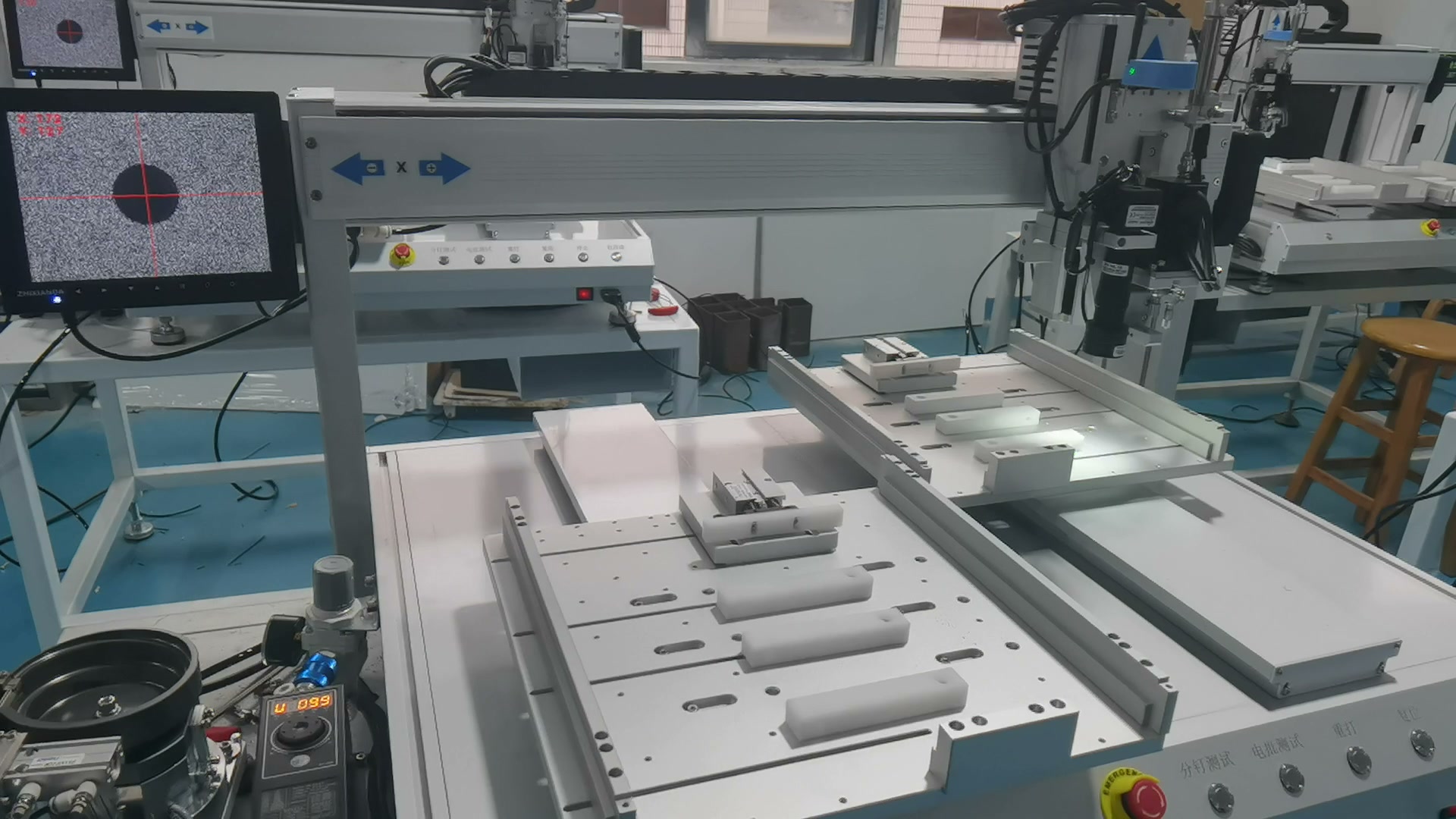
A ZM320 screw fastening station between jobs — the kind of window the calendar uses for weekly checks. The photograph shows the machine in normal operation, not a maintenance task being performed.
The monthly work needs a different kind of window: a planned slot on the production schedule, visible to the planner, not a gap the technician hopes will appear. Put it on the same board as the production plan, in the same ink. A maintenance slot that lives only in the technician’s head will be the first thing the production plan overwrites.
This section is reasoning, not measured data: it describes the pattern to watch for, drawn from how the stations depend on each other, and it should be read as a way to recognise a slipped check, not as a failure-rate claim. The pattern is consistent: a skipped check rarely shows up at its own station. It shows up at the next station downstream, wearing a different symptom, which is why slipped maintenance is so often misdiagnosed as a defect at the station where it is found.
| Check that slipped | First symptom | Where it shows up |
|---|---|---|
| Printer cleaning cycle and squeegee check | Uneven paste deposits, bridging on fine pitch | At SPI, after the printer — not at the printer |
| Placement nozzle and feeder check | Mis-picks, dropped parts, skewed placement | At AOI or after reflow, as missing or shifted parts |
| Inspection camera and lighting check | False rejects rising on good boards | At the inspection station itself, as rework that was never needed |
| Oven checks per the oven plan | Profile drifting away from the verified recipe | At reflow and at final test, as joint defects |
| Screw feeder and driver-bit check | Missed or loose screws, stripped heads | At final assembly check, far from the fastening station |
Two practical consequences follow. First, when a defect appears downstream, check the upstream station’s maintenance record before adjusting the downstream machine: the printer’s missed cleaning cycle is a more likely cause of a paste defect than the SPI’s settings. Second, the checks that slip first are the ones with no owner and no record — the weekly round that belongs to “maintenance” in general, and the monthly calibration that nobody’s shift plan includes. If a station’s defect rate is climbing and its log is empty, the log is the finding.
Whether skipped maintenance is actually showing up in the line’s numbers is a measurement question, and it needs the line’s own data. For how to read those numbers without fooling yourself, see How Efficient Is Your SMT Line, Really? Reading OEE Without Fooling Yourself. This article makes no claim about how much downtime or how many defects a calendar saves — that depends on the line, and only the line’s own before-and-after records can say.
A calendar that takes a month to write will never be written. Start with five steps, done in one week. First, list the stations on the line as they actually stand, in line order, and delete the rows for machines the line does not have. Second, open each machine’s manual — or its product page, where the schedule is published, as the M8 and L5 pages do — and copy its tasks and intervals into that station’s row. Third, put a named role against every row, and a second name against the review of the record. Fourth, pick the windows: daily checks into startup, weekly checks into changeovers, monthly checks into one planned slot. Fifth, start the record on Monday and review it on Friday: which rows were done, which were missed, and why.
A small worked illustration shows why the counting matters — and it is an illustration, not a measured figure. Take a five-station line with three daily checks per station: that is fifteen daily checks. At two minutes per check, the startup round takes thirty minutes across the line, done in parallel by five operators in about six minutes each. If the same fifteen checks had no owner and were left to one technician after the shift, they would take the same thirty minutes but cost a stopped line to do them. The arithmetic is trivial; the point is that the calendar’s cost is only visible once the checks are counted, and uncounted checks look free until they are missed.
Review the calendar itself every quarter, or after any recurring defect: drop the rows that never find anything, add a row for the check that would have caught the last defect, and move any check whose interval the manual has revised. A calendar that never changes is a calendar nobody is reading.
Four limits, stated plainly so the calendar is not asked to do jobs it was not built for. It contains no machine-level procedure: the steps for cleaning a stencil, calibrating a feeder, or servicing an oven live in each machine’s manual and its own maintenance guide. It contains no reflow-oven maintenance procedure at all, for the reason given in section 1. It lists no spare parts and no part numbers. And it states no maintenance interval as a standard: every interval in the table is either the frequency a machine’s own published schedule uses for that machine, or a frequency band to confirm against the manual before it is written in.
The fifth limit is about who sells what. JHIMS sells the machines on the line — printers, placement machines, reflow ovens, inspection systems, dispensing machines and screw fastening machines — and publishes the maintenance schedule for several of them on their product pages. It does not sell a maintenance service, and this article is not a service offer. The calendar is the buyer’s own plan; the machines’ pages are where each row’s detail comes from.
One for the line, pointing at one schedule per machine. The line calendar is the page the shift lead reads; the machine schedules are the documents it points to. A factory that runs only a printer needs only the printer’s calendar — which is the printer’s own published schedule, not this article.
No. Intervals come from each machine’s own manual. Two printers from the same supplier can have different monthly tasks, as the M8 and L5 schedules in section 2 show. Copying an interval from one machine onto another looks organised and is wrong.
Ask the supplier for the maintenance plan before the machine is accepted, and do not accept “it needs no maintenance” as an answer — every machine on an SMT line has wear parts and consumables. Until the plan arrives, leave that row marked “plan requested” rather than inventing intervals.
The shift lead or the quality technician — somebody other than the person who did the checks. The review is the step that keeps the calendar honest: a record nobody reads will stop being filled in, and the first sign of that is a defect, not an empty page.
No. If the existing list already answers what, how often, by whom and where it is recorded for every station, it is already a calendar — keep it, and use this article only to check it for missing owners, missing records and rows that point nowhere. Replace only the rows that cannot answer all four questions.
Bottom line: Write one page with one row per station, a named owner against every row, and a record that shows what was found — then take the intervals from each machine’s own manual, not from this article. Start the record on Monday, review it on Friday, and the calendar will tell you within a month which checks were real and which rows were fiction.
Questions about the M8 or L5 printer, the YSM40R placement machine, the R10 reflow oven, or setting up a maintenance calendar for your SMT line? Contact JHIMS at [email protected] for technical information.


 Teams
 whatsapp
 telegram
