
News
Direct answer
A reflow profile is not valid because the oven display looks right. It is valid only when thermocouples on a production-representative board show that every critical point — not the average — stays inside the solder paste maker's window and inside every component's temperature limit. Check five readings on that board: ramp rate, soak, time above liquidus, peak temperature, and cooling rate. If any one thermocouple fails, the profile fails, even if the other points pass.
Run a profile before the first production run of a board, not after defects appear. A profile taken on a scrap board, an empty oven run, or a different board is not evidence for the board you are about to build.
Re-profile when anything that changes how the board heats changes. That includes a new board revision, a different solder paste or paste lot used with a different datasheet window, a new large component, a change of board supplier or copper weight, and any oven maintenance that touches heaters, fans, conveyor drive, or exhaust. The JHIMS R10 product page states the same rule in plain terms: re-profile after any significant board design change or oven maintenance.
A common failure is reusing last month's profile because "the oven has not changed." The board, the paste, or the load may have changed even when the oven has not.
Do these checks before attaching thermocouples, so a bad test run is not mistaken for a bad profile.
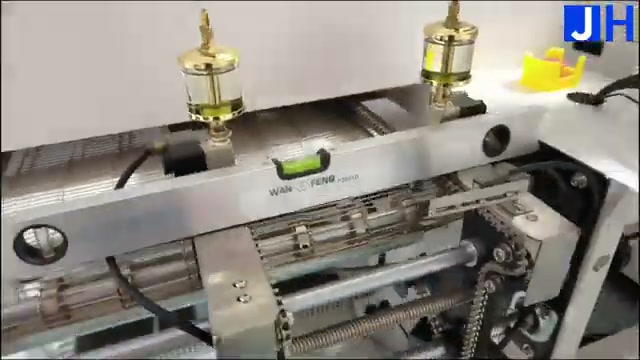
Figure 1. Conveyor and level check at the oven entrance before a profiling run. Confirm the rail width, level state, and stable oven state before the test board enters.
Oven setpoints are air temperatures in the zones. Board temperatures are what the solder joints experience. The two are not the same, and the difference is largest where thermal mass differs most.
Place thermocouples to find the hottest and the coldest points, not to confirm a comfortable middle. At minimum, cover these locations on a production-representative board:
| Thermocouple location | Why it matters |
|---|---|
| Largest thermal-mass component (for example a large BGA or QFN) | Usually the slowest to heat and the last to reach liquidus; the coldest point is often here. |
| Small, low-mass component near the board edge | Heats fastest and can overshoot while large parts are still catching up. |
| Board corners and edges | Edge losses and airflow differences show up here first. |
| Underside / second-side component, for double-sided boards | The second side experiences a different thermal history and must be measured, not assumed. |
| A component with the lowest temperature limit on the board | Peak temperature is limited by the most sensitive part, not by the paste alone. |
Attach each thermocouple so it stays in contact through the whole run, using high-temperature solder or a high-temperature adhesive made for profiling, following the profiler maker's method. Loose tape that lifts in the tunnel produces a curve that looks like a board problem but is only a sensor problem. If a channel shows a sudden step, a flat line, or a reading that contradicts its neighbours, treat the sensor as suspect first: check attachment and repeat the run before changing the recipe.
Use the same board construction, copper distribution, and component population as production. A bare board, or a board with only the large parts fitted, heats differently and will mislead every adjustment that follows.
Read the curve in four phases — ramp, soak, reflow, and cooling — and judge five numbers. The windows below are for lead-free SAC305 (Sn96.5/Ag3.0/Cu0.5) as a starting reference. The solder paste datasheet for the paste actually in use governs: if its window is narrower, its window wins.
| Reading | SAC305 starting window | What it controls |
|---|---|---|
| Ramp rate (preheat) | 1–3 °C per second | Thermal shock, paste splatter, and component cracking risk when heating is too fast. |
| Soak | 150–200 °C for 60–120 seconds | Flux activation and temperature equalisation across the board. |
| Time above liquidus (TAL) | Typically 45–90 seconds above 217 °C | Whether the alloy fully melts and wets both surfaces. Confirm the exact window on the paste datasheet. |
| Peak temperature | 235–250 °C | Joint formation versus component and board damage. No thermocouple may exceed its component limit. |
| Cooling rate | 2–4 °C per second | Joint grain structure; too slow coarsens the joint, too fast stresses it. |
The ramp, soak, peak, and cooling windows above are the typical SAC305 values published on the JHIMS R10 product page. The TAL window is an industry-typical range, not a JHIMS specification: use it only as a reading guide until the paste datasheet gives the binding number for the paste in use.
How to read a spread — an illustrative example, not a measured board
Suppose the coldest thermocouple peaks at 236 °C and the hottest at 248 °C. Both are inside the 235–250 °C window, but the 12 °C spread is the information: the coldest point has almost no margin above the window floor, so any small change in load or paste lot could push it out. Judge each thermocouple against the window, and treat a large spread as a warning to improve equalisation (longer soak, adjusted zone balance, or slower belt speed) rather than celebrating an average that passes.
Do not average the thermocouples into one curve and pass the average. An average can pass while the coldest joint never fully wets and the hottest component is already over its limit.
Change one variable at a time and re-run. Changing zone temperatures and belt speed together makes the next curve uninterpretable.
| Symptom on the curve | Check first |
|---|---|
| Coldest point never reaches liquidus, or TAL too short | Soak time and reflow-zone balance for that area; belt speed; whether the test board matches production thermal mass. Do not raise every zone — the hottest point may already be near its limit. |
| Hottest point exceeds the component limit | Peak-zone setpoints affecting that area, and whether that component's limit was checked before the run. A paste window does not override a component limit. |
| Large spread between hottest and coldest points | Soak duration and zone balance; board orientation and loading; large-mass parts placed next to small parts without equalisation time. |
| Ramp too steep in the early zones | Early-zone setpoints and belt speed; a steep ramp is a recipe setting, not a paste property. |
| Cooling too fast or too slow | Cooling-zone settings and board load; cooling is part of the profile, not an afterthought after the peak. |
| One channel disagrees sharply with its neighbours | Thermocouple attachment and channel integrity first. Fix the measurement before changing the process. |
Adjust in small steps. The JHIMS R10 product page recommends adjusting zone temperatures in small increments of 2–5 °C and reviewing the curve against the paste datasheet after each change. Large jumps overshoot the window and waste test runs.
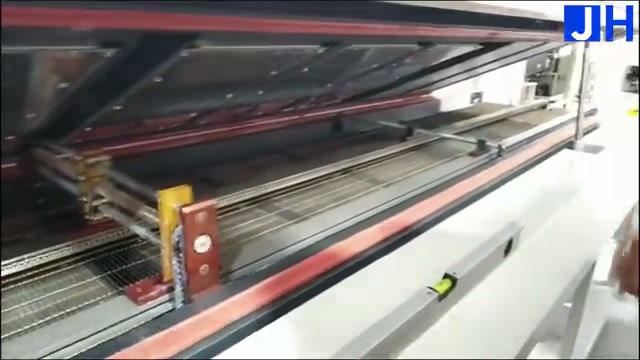
Figure 2. Open-cover inspection before profiling: the raised top cover exposes the heating tunnel and conveyor, held by the red safety support rod. A tunnel or fan problem found here is cheaper than a failed production batch found later.
Accept the profile only when all of these are true, for every thermocouple:
If any point fails, adjust one variable, re-run, and re-judge all five readings — not only the one that failed. A fix for TAL can move the peak; a fix for the peak can move cooling. Save the accepted recipe under the board's name, not under a generic name, so the next operator loads the right recipe.
If the profile cannot be made to pass without exceeding a component limit, stop and escalate: the board, the paste choice, or the component choice needs review. Forcing a pass by ignoring a component limit trades a visible defect today for a latent field failure later.
Profiling is a measurement discipline, not a machine feature: any oven still needs a thermocouple run on a production board. What an oven can do is make that discipline easier to repeat. The JHIMS R10 lead-free hot air reflow oven provides 20 independently controlled heating zones (10 upper + 10 lower) with PID closed-loop control and ±1 °C temperature accuracy, a temperature range up to 300 °C, a 3,840 mm preheating tunnel, and a 1,260 mm dual-sided cooling section (3 upper + 3 lower zones).
For profiling work, three properties matter most. First, independent zone control lets the engineer balance the curve area by area instead of raising the whole oven to fix one cold point. Second, the long preheating tunnel gives soak time for large thermal-mass boards. Third, recipe management and data logging on the Windows 10 + Siemens PLC control let each board keep its own verified recipe and its own curve record, rather than relying on an operator's memory.
The limits are equally plain. The R10 page gives a typical SAC305 curve, not a universal recipe: the paste datasheet and the component limits for the board in use still govern every pass/fail decision. Transport speed (300–2,000 mm/min), maximum board width (460 mm), and top/bottom component clearance (25 mm each) must also be checked against the board before profiling, not discovered during the run. For upstream context, see how solder paste printing sets up the joints that reflow must then form, in How Solder Paste Printing Transforms SMT Assembly in 2026; for what happens after reflow, the buy-order guide SPI or AOI First? A Buy-Order Decision Guide for SMT Lines explains where post-reflow inspection fits.
How many thermocouples are enough?
Enough to find the hottest and coldest points on that board. For most boards that means at least the largest-mass component, a small edge component, the board edges, and any component with the lowest temperature limit — plus an underside point for double-sided boards. Fewer points are a gamble, not a saving.
Can I profile with the oven's built-in monitoring instead of thermocouples?
No. Oven monitoring reports zone conditions. Only thermocouples on the board report what the joints experienced. Use both, but judge the profile by the board curve.
The paste datasheet and the R10 typical curve disagree. Which wins?
The paste datasheet for the paste in use wins, and component limits override both. Typical curves are starting references, not specifications for your board.
How often should a verified profile be re-checked?
After every trigger in Section 1, and as a routine check when production restarts after a long stop or maintenance. A profile is a record of a specific board, paste, load, and oven state — change any of them and the record needs re-validation.
What should I save with the accepted profile?
Board identity, paste identity and datasheet window, recipe name, thermocouple positions, the curve file for each run, the pass/fail judgement per thermocouple, and the date and operator. Without that bundle, the next team cannot repeat the pass.
For the R10 specification sheet, a profiling discussion for your board, or a quotation, contact JHIMS at [email protected] with your board size, paste type, and largest component type. Those three facts decide most profiling questions before any oven setting is discussed.


 Teams
Teams
 whatsapp
 telegram
